
C2PA for Photographers and the Tiny Blemish Question

Several club members have asked me during my talks how a judge would ever know that generative AI was used to remove a tiny blemish. The example is always small, never a replaced sky, and it is a fair question because nobody can tell by looking.
A judge cannot know by eye. A small generative fill leaves no visible trace. The only dependable record is Content Credentials, the C2PA standard built into Lightroom Classic and Photoshop, which notes the editing tools used, including generative AI. It exists only if you switch it on, and its absence proves nothing either way.
So why would a record matter more than the pixels themselves?
What C2PA records, and what it cannot
C2PA is a signed record attached to an image file that says who made it, what they used, and what was done to it afterwards.

The name stands for the Coalition for Content Provenance and Authenticity, an industry standard backed by Adobe, Microsoft, the BBC, Sony and Google. Adobe calls its version Content Credentials.
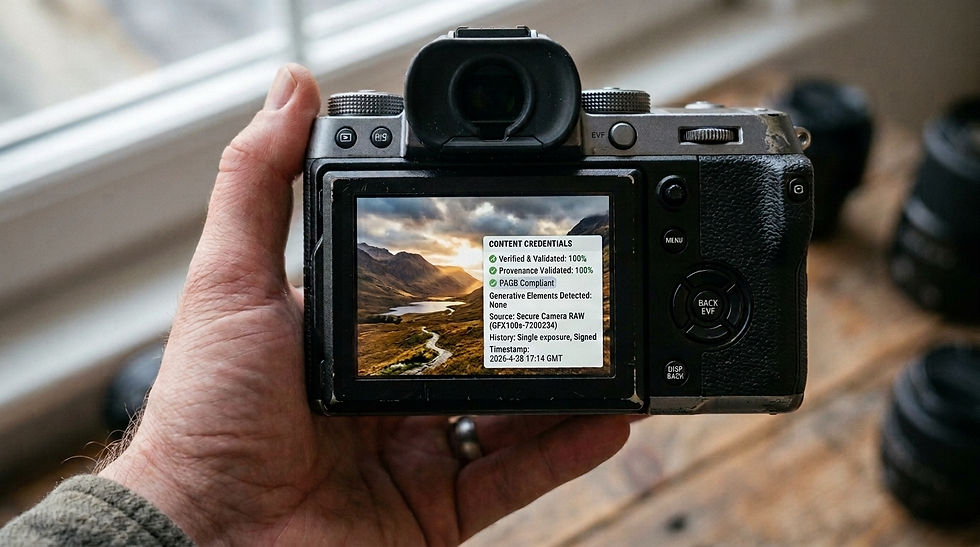
Think of it as a tamper-evident seal. When a signing camera fires the shutter, it cryptographically signs the file, noting which device captured it and when. Someone can strip or rewrite ordinary EXIF data in seconds. A C2PA manifest is bound to the file, so changing the image outside a tool that adds to the record breaks the signature.
Two limits matter. C2PA does not detect AI. It shows provenance, so a file with no trail is simply a file with no trail. A signature shows that a particular device wrote the file and that it hasn't changed since, which isn't the same as proving the scene was real. Resizing or uploading through a service that ignores C2PA can also strip the credentials altogether.
That is why the tiny blemish is the interesting case. It is the edit the pixels cannot reveal and a record can.

Which cameras sign at capture, and where my Sony a7 IV stands
Several manufacturers now sign at capture, though the terms differ. This is where support stands in October 2026.
Sony signs on the Alpha 1, Alpha 1 II, Alpha 9 III, Alpha 7R V, Alpha 7 IV and Alpha 7S III. A basic certificate comes at no extra cost, and a paid licence aimed at newsrooms adds more. The a7 IV needs firmware 3.00 or later.
Leica signs on the M11-P, M11-D, Q3 Monochrom, SL3-P and SL3-S.
Canon signs on the EOS R5 Mark II and EOS R1, with paid activation aimed mainly at news organisations and availability that varies by region.
Fujifilm signs on the X-T50 and GFX 100S II, at no charge.
My a7 IV runs firmware version 3, which adds signing, and I haven't switched it on yet. A body without signing can still start the chain at export. Lightroom Classic and Photoshop can both originate Content Credentials, which is weaker than sensor-level signing because nothing proves what happened before the file reached my computer. It still names me as the creator and documents the edits.

Lightroom Classic and Photoshop, and where the chain breaks
In Lightroom Classic, go to File > Export and scroll to Content Credentials. You can attach the credentials to the file, publish them to Adobe's Content Credentials cloud, or do both. I choose both. Attaching means they travel with the image, and publishing means they can be recovered if someone strips the embedded data. Adobe notes that published credentials may appear in search results for similar content, so think about that if privacy matters to you. They work with every export format except PSD and PSB, they need an internet connection, and they must be switched on for each document if edits are to be recorded.

Photoshop has its own Content Credentials panel under Window, and it tracks your editing history as you work. The catch is the round trip. Using Edit In to send an image from Lightroom Classic to Photoshop and back does not currently carry the credentials across cleanly. The workaround is to export a JPEG from Lightroom Classic with credentials enabled, open it in Photoshop with credentials enabled, and export it again. It works, though it is clunky, and Adobe says interoperable workflows are in development.

Third-party tools are the weaker link. As far as I know, files from DxO PureRAW, Topaz and the Nik Collection do not carry C2PA credentials, and any tool in the chain that ignores the manifest breaks it. If you rely on plug-ins, either the chain starts at your final export, or you rebuild the workflow around it.
What this means for camera clubs
As far as I know, no UK club requires C2PA, but the direction is clear. The RPS, PAGB, SPF and FIAP all have positions on generative AI, and I cover where they stand in my guide to UK photographic standards.

Back to the blemish. If a judge or competition secretary asks whether AI was used, a credential that lists only conventional tools answers the question better than my words could. One that records generative tools tells the truth about that too. The record only helps if it exists, which is the whole argument for switching it on before anyone asks.
Beyond the club, the pressure is building. Article 50 of the EU AI Act has applied since 2 August 2026, and providers of image generators have until 2 December 2026 to mark their output in a machine-readable way.
Proving a photograph is genuine is becoming a professional asset rather than a curiosity.
Try it on one image
Switching on Content Credentials in Lightroom Classic takes about a minute and costs nothing. My walkthrough of the Content Credentials panel covers each setting. Try it on one photograph and let me know in the comments what the record says about your edit.

Comments