
SD Card Buying Guide: Symbols Explained & How to Stop Overspending


If you have ever stood in the electronics aisle, staring blankly at a wall of plastic-wrapped memory cards and wondering why one costs £15, while the seemingly identical one next to it costs £150, you are not alone.
As a professional photographer, I rely on these small plastic cards. I have seen cheap cards fail during a wedding (heartbreaking) and costly cards that were completely unnecessary for the job (wallet-breaking).
The manufacturers don’t make it easy. They cover the packaging with cryptic symbols, acronyms, and marketing numbers that often mean little in real life. But don’t worry. I’ll translate the jargon into plain English in this SD card buying guide so you can buy precisely what you need without paying for “Pro” features you’ll never use.
Part 1: The Big Guys (Standard SD Cards)
These are the postage-stamp-sized cards used primarily with digital cameras (DSLRs and Mirrorless) and audio recorders.

The Capacity: SDHC vs. SDXC
You will see these acronyms next to the gigabyte (GB) number.
SDHC (High Capacity): Up to 32GB. These are older tech. Unless you have a very old camera (10+ years), you can mostly ignore these.
SDXC (Extended Capacity): 64GB to 2 TB. This is the standard. Most modern devices optimise for this format.
SDUC: The new kid on the block (Ultra Capacity). You likely won’t see these in the wild yet, so feel free to ignore them for now.
The Speed: The “Alphabet Soup”
This is where people get confused. You might see a card marked with Class 10, U3, and V30 at the same time. Why three ratings? Because the standards kept evolving, but they kept printing the old logos so people wouldn’t panic.
Here is the hierarchy of what actually matters:
The “C” Class (The Old School)
Class 10 (C10): A C with a 10 inside it. This used to be the gold standard; now it is the bare minimum. It guarantees a write speed of 10MB/s.
Verdict: If a card only has this symbol and nothing else, it is likely very old or very cheap. Fine for basic JPEGs, bad for video.
The “U” Class (The Middle Ground)
U1: A bucket shape with a 1. Same speed as Class 10.
U3: A bucket shape with a 3. This guarantees 30MB/s.
Verdict: U3 is the sweet spot for most casual users. It handles Full HD video and rapid photo capture seamlessly.
The “V” Class (The Modern Standard)
If you are shooting video, look at the V-rating. It is the most reliable indicator of sustained speed (crucial so your video recording doesn’t suddenly stop).
V30: The minimum standard for 4K video. If you bought a modern camera for holiday clips, get a V30 card.
V60: For high-bitrate 4K or 6K video. Professional territory.
V90: The Ferrari of cards. Necessary for 8K video or for slow-motion. Very expensive.

The Pins: UHS-I vs. UHS-II
If you look at the back of the card:
UHS-I: Has one row of metal pins. Standard speed.
UHS-II: Has two rows of metal pins. These are incredibly fast at offloading photos to your computer, but they are expensive.
Note: You can use a UHS-II card in a UHS-I slot, but you won’t get the speed benefit.
Part 2: The Little Guys (MicroSD Cards)
These fingernail-sized cards are for your Android phone, Nintendo Switch, Steam Deck, GoPro, or Drone.
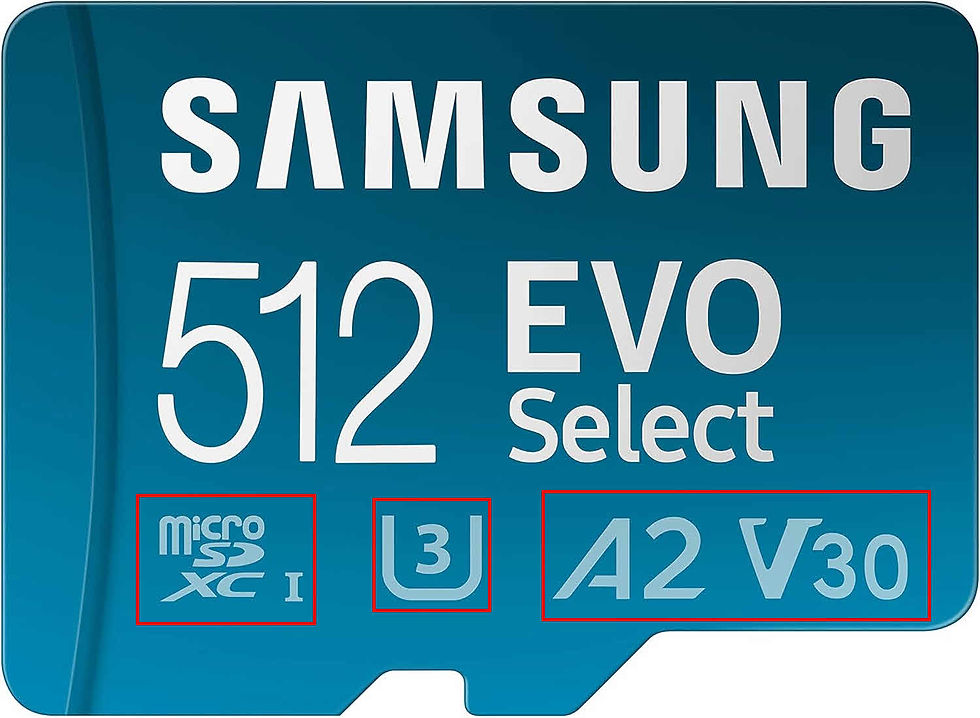
Physically, they are just smaller SD cards. They share the same Speed Classes (U3, V30, etc.) as the big guys above. However, there is one critical symbol unique to MicroSD cards that you must look for if you are using them for apps or games.
The “A” Rating: App Performance
When you insert a card into a drone or camera, it writes a single large file (video). When you insert a card into a Nintendo Switch or a smartphone, the device continuously reads and writes small amounts of data (loading game textures, saving game states, running apps). Standard cards are bad at this “random” access.
That is why the Application Performance Class was invented.
A1: The baseline. It’s “okay” for basic phone storage (photos, music), but it might feel sluggish when running heavy apps.
A2: The game changer. These cards use command queuing to process read/write operations more quickly.
Verdict: If you are buying for a gaming console (Switch/Steam Deck) or a Raspberry Pi, always pay the extra few pounds for an A2 card. Your load times will thank you.
Drone Specifics
For drones (such as DJI Mini, Air, or Mavic series), the “A” rating matters less, while the “V” rating matters more. Drones record high-quality 4K footage.
Recommendation: Look for MicroSDXC, V30. Do not buy a cheap generic card; otherwise, your drone will land, and the footage will be corrupted or jittery.
Part 3: The Ultimate SD Card Buying Guide Matrix
Still not sure? Find your user profile in the table below to see exactly what to look for.
User Profile | Typical Device | Key Symbols to Look For | Approx. Price (128GB) |
|---|---|---|---|
The Casual Snapper | Point & Shoot, Entry DSLR | £12 - £15 | |
The 4K Content Creator | Modern Mirrorless (Sony A7, Canon R) | £20 - £35 | |
The Pro Photographer | High-end Camera, Burst Mode Sports/Wildlife | £60 - £150+ | |
The Gamer | Nintendo Switch, Steam Deck | £20 - £40 | |
The Drone Pilot | DJI Mini, GoPro Hero | MicroSDXC, V30, U3 (A1/A2 doesn’t matter as much) | £18 - £30 |
The Home Security | Dashcam, CCTV, Ring Doorbell | High Endurance (Look for words like “Endurance” or “Pro Monitoring”) | £20 - £30 |
Pro Tip: Beware of fakes! If you see a 1TB card for £15 on a random marketplace, it is a scam. Always buy from reputable retailers and stick to well-known brands such as SanDisk, Samsung, Lexar, Integral or Kingston.
A final word of advice
Storage is cheap; memories are priceless. Don’t risk losing your holiday photos or your wedding video to save £5 on a generic card.

Comments